
Bank statement converter
Convert one statement or a whole year. DocFig joins them into one checked spreadsheet and tells you if a month is missing or a row appears twice.
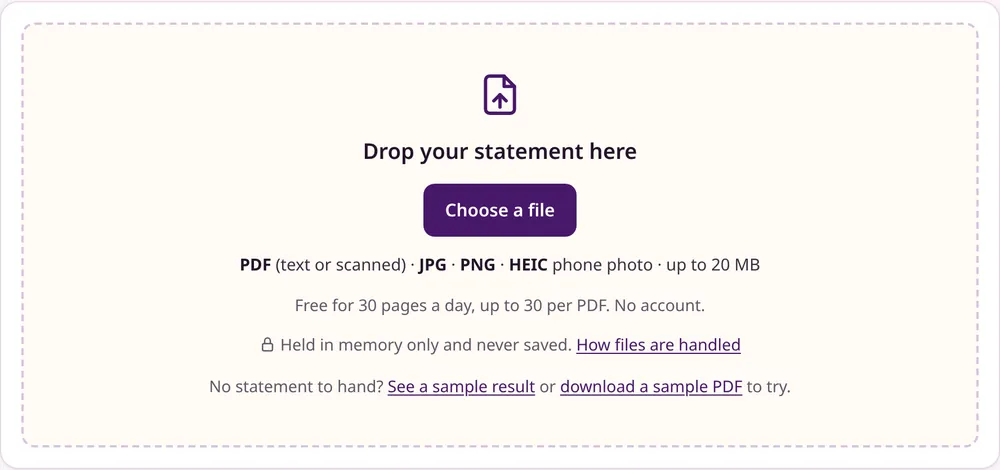
Drop one statement, or a whole year of them
PDF (text, scanned or password-protected) JPG PNG HEIC phone photo up to 20 MB
Free for 30 pages a day, up to 30 per PDF. No account.
Held in memory only and never saved. How files are handled
No statement to hand? or download a sample PDF to try, or .
This statement is password-protected
Enter the password your bank gave you. It is used once, in memory, to open the file, and is never stored.
Where to find the password
The email with the statement usually says how the password is made. Often it is the first four letters of your name plus your birth date as DDMM (case varies), or a customer ID. Formats by bank
Uploading
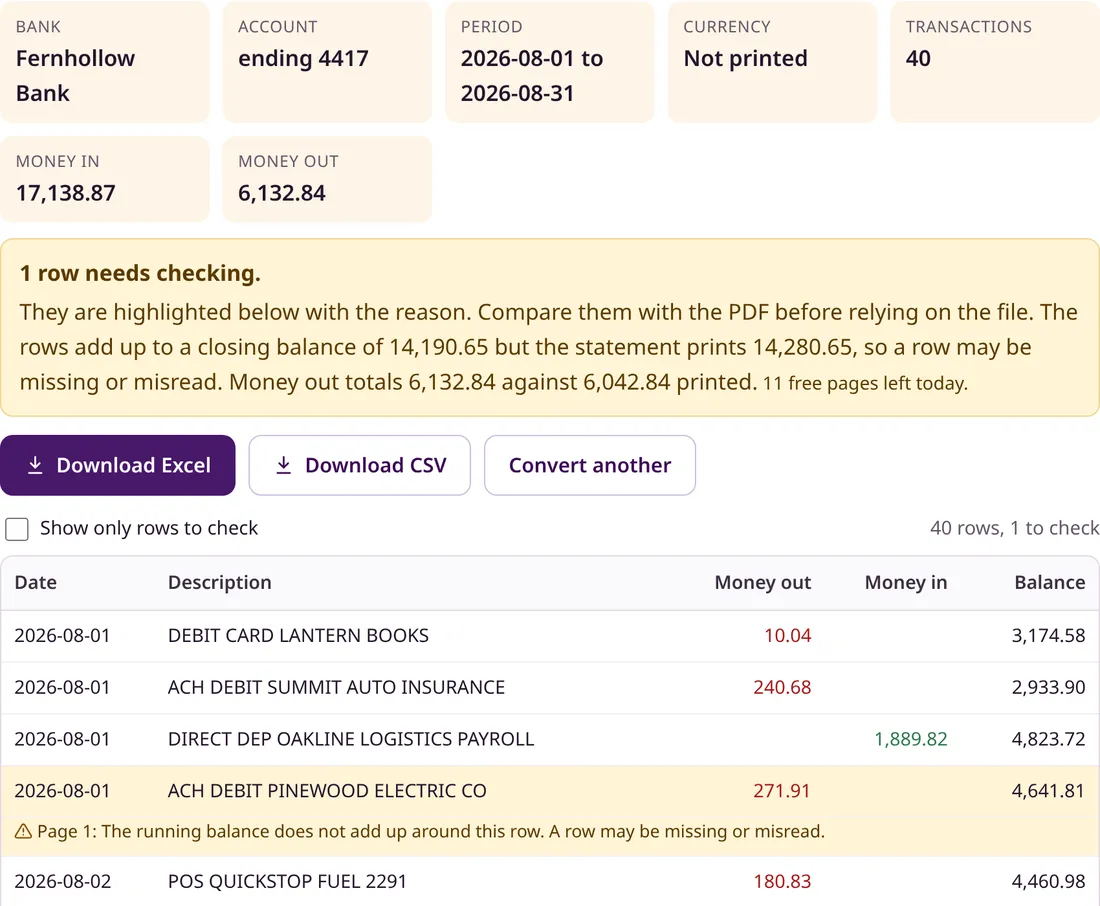
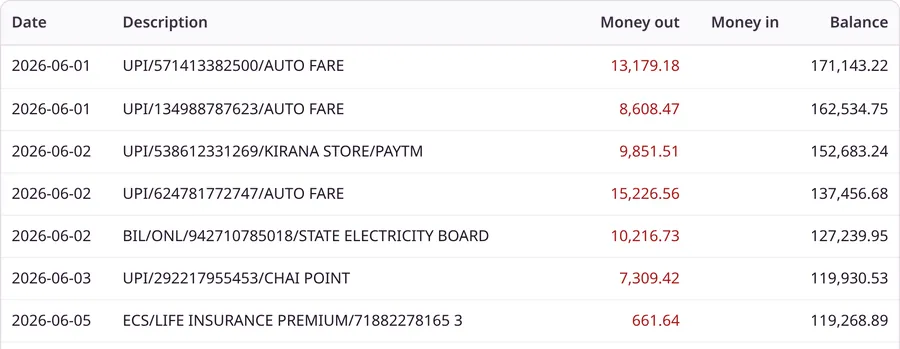
Sample result from a fictional statement
| Date | Description | Money out | Money in | Balance |
|---|
Money in is positive and money out is negative in the Amount column of both files. The browser keeps these rows; nothing is stored on the server.
- No account or email
- Every row checked against the statement
- Held in memory, never stored
Four steps
How to convert a bank statement in four steps
Screenshots from this converter, using a fictional sample statement.
- 1Drop the filePDF, scan or phone photo
- 2It reads every rowOCR for scans and photos
- 3Review the tableProblems already marked
- 4DownloadExcel or CSV
Drop the statement PDF or photo
Drag it onto the box or choose it from your device. PDF, JPG, PNG or HEIC, up to 20 MB, no account.
DocFig reads every transaction
Each page is read in seconds; scans and photos go through OCR first. Long statements are read several pages at a time.

Review the rows, with problems marked
Totals, period and account ending at a glance. A row that does not add up is highlighted with the reason, like the one in this sample.
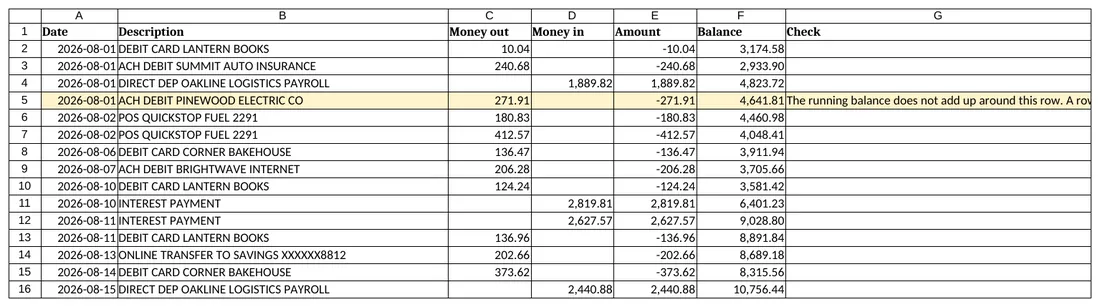
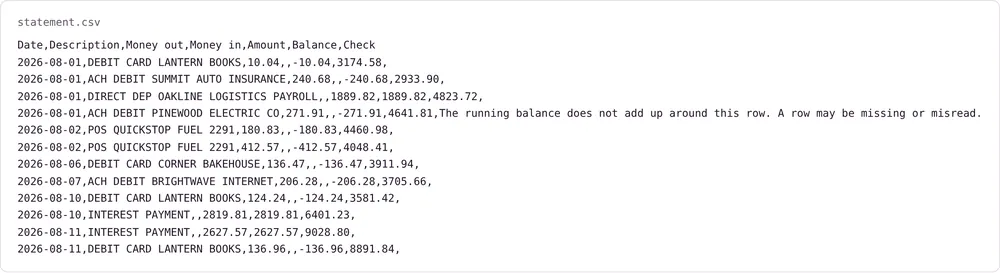
Download Excel or CSV
Real dates and numbers, filters on, the flagged row in yellow with its reason. The CSV has the same columns.
One converter
Convert any bank statement to Excel or CSV
PDF bank statement to Excel
A workbook with real dates, numbers and filters.
Bank statement to CSV
UTF-8, ISO dates, signed amounts. Imports cleanly.
Scanned bank statements
Pages without text are read with OCR.
Photo of a statement
JPG, PNG or HEIC straight from your phone.
Credit card statement to Excel
Purchases out, payments and refunds in.
Debit, credit, DR and CR
Separate columns or markers, read correctly.
Multi-page statements
Up to 30 pages, checked across page breaks.
Running balance check
Every row tested against the printed balances.
A year of statements at once
Up to 24 files joined into one workbook, with missing months and repeats found.
Checked, not guessed
A running balance check on every row
Each balance must equal the one before plus the rows between. One wrong figure or missing row breaks the chain at that exact spot, and you see where.
- Opening plus rows equals closing
- Printed totals must match
- Every amount found in the page text
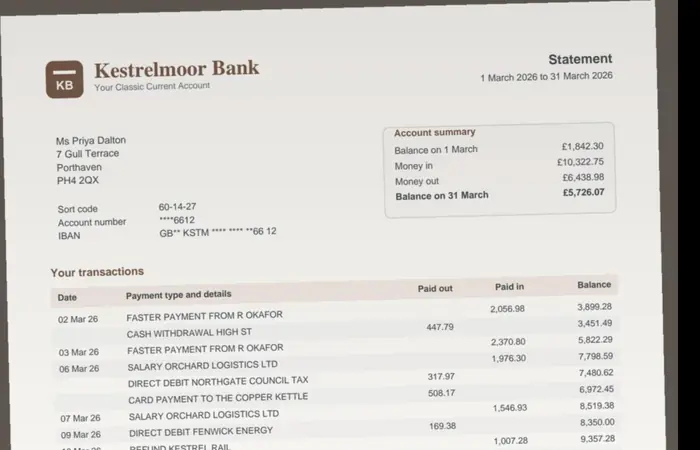
Paper statements too
Scanned statements and photos of statements
Photograph a paper statement and upload the image. A flat, well-lit photo works best, and any misread digit is caught by the balance check.
Any bank
Which banks and statement formats work
No list of supported banks: each page's layout is read. Tested on fictional statements in these styles.
Europe
Decimal commas, newest-first lists.
Made for real paperwork
Who uses a bank statement converter
Accountants and bookkeepers
Client statements into spreadsheets or imports.
Small businesses
Monthly income and expense reconciliation.
Tax preparation
Total a year of deductible spending.
Loan and rental applications
Months of statements, summarised.
Budgeting
Spending sorted by payee or category.
What happens to your statement
The short version. Every step, and every outside service involved, is on the Security page.
Coming later
DocFig Sign is planned next.
Simple e-signatures, from the same suite of focused document tools. Not available yet.
Questions
Is the bank statement converter free?
Yes. Each connection can convert up to 30 pages a day without an account or email, with up to 30 pages and 20 MB per file. A paid Pro plan with higher limits is planned but not on sale yet; there is a waitlist on this page.
How do I turn a statement into a spreadsheet?
Drop the PDF into the converter at the top of this page, review the table that appears, and choose Download Excel. Choose Download CSV instead for a plain text file. The workbook itself is described on the pdf bank statement to Excel page.
Which files and banks work?
PDF statements, text, scanned or password-protected, and photos saved as JPG, PNG or HEIC, from any bank or card issuer. Separate debit and credit columns, DR and CR markers, decimal commas, Indian digit grouping and newest-first statements are all handled. Scans and photos are read with English OCR.
Can I convert several statements at once?
Yes. Choose or drop up to 24 files together. Each is converted and checked, then joined into one workbook per account, in date order. DocFig checks that each statement's closing balance matches the next one's opening balance, names any missing month, and keeps a transaction once when two statements overlap, listing the removed copies on their own sheet. Before converting, it says how many pages fit in today's free allowance.
How accurate is the conversion?
Every row is checked against the statement's own arithmetic: the running balance on each line, the opening and closing balance, and any printed totals. Each amount must also appear in the page text. When something does not add up, the row is highlighted with the reason, so you know exactly where to look.
Is my statement uploaded?
Yes. The file is sent over HTTPS to the DocFig server, held in memory while it is converted, and never written to disk. Account and card numbers are masked before the text is passed to the AI model that reads the rows. Nothing is kept after the result reaches your browser. DocFig does not train on statements, and OpenAI states that API data is not used to train its models.
Can I convert a bank statement to CSV instead of Excel?
Yes. After the table appears, choose Download CSV. The file is UTF-8 with ISO dates, a dot as the decimal point, and both a signed amount and separate money in and money out columns.
Can I convert a scanned statement or a photo of a statement?
Yes. Scanned PDFs and photos saved as JPG, PNG or HEIC are read with OCR and then checked like any other statement. A flat, sharp, well-lit image converts best.
Does it work with credit card statements?
Yes. Purchases, fees and interest become money out; payments and refunds become money in. When the statement prints a previous and new balance, the rows are checked against them.
How long does a conversion take?
Most statements finish in well under a minute. Each page takes a few seconds, and pages of a long statement are read several at a time.
Can it open a password-protected PDF?
Yes. Upload the statement as it is; DocFig asks for the password your bank gave you, opens the file in memory and converts it. The password is used once and is never stored or sent to the AI model. Common password formats.
What columns does the Excel or CSV file have?
Date, Description, Money out, Money in, Amount and Balance, plus a Check column that explains any row that failed a check. Amount is signed: positive for money in, negative for money out.
How does the running balance check work?
Where a balance is printed on each line, every balance must equal the previous one plus the transactions in between. The opening balance plus every row must reach the closing balance, printed totals must match, and every amount must appear in the page text. If money in and out were swapped on a row, the printed balance proves it and the row is corrected and labelled; anything uncertain is highlighted, never quietly changed.
Need more pages? Join the Pro waitlist
Pro is planned for people who convert statements every month: higher limits, batch upload and more export formats. It is not on sale yet. Leave an address and one email goes out when it is ready.
Used only to tell you about Pro. No newsletter, never shared. See Privacy.